Deployment Videowall
The videowall of a deployment displays the user desktop screens in real time, allowing you to monitor them (view mode) or, if necessary, take control. Access it from the deployment using the Videowall button.
Roles with access
- Advanced, manager, and administrator roles, for deployments they own or co-own. Administrators have access to all; managers have access to those in their category. Users with the User role do not have access to this page.
This feature is only available in the new interface (new interface).
In the side menu, the Deployments section; this feature is within that screen.
Table view
This feature is only available in the new interface (new interface).
Displays the video wall desktops in a table. The toolbar button toggles between Table view and Card view; the browser remembers the last selected view.
With Group by user, the table is unique and sorted by user; with Group by desktop, there is a table for each desktop in the deployment.
Conditions and messages
- The page is accessible to advanced, manager, and administrator roles.
- If the filter or search leaves no desktops, the screen displays a "no results" empty state with options to clear the search and filters.
- Rows have the same actions as cards (start, stop, viewer, information, networks, and bastion).
Development details
For those who develop or integrate IsardVDI: where each element of this section is in the code, from which version it is available, which API operation it calls, and what messages it can return.
- New interface · file
views/deployments/DeploymentVideowallView.vue:418· interface text (translation key)views.deployment-videowall.view.table- since v17.71.0 (2026-10-02,
882bb78f0c) - on click:
viewMode = viewMode === 'cards' ? 'table' : 'cards'
- since v17.71.0 (2026-10-02,
Commit code d90222c5.
Card view
This feature is only available in the new interface (new interface).
Default view: one card per desktop, showing the user, the status, and the desktop actions. The cards adjust to the window width (medium size below 1280 px width, large size above).
- Group by: user (default) or desktop. Each group shows how many desktops it has and, if applicable, how many are started and how many failed.
- Filter by user or desktop: text search on the user name and the desktop name.
- Filter tags: Status (Started / Stopped) and Desktops (each desktop defined in the deployment), with the count for each option.
- On each card, the desktop can be started or stopped; the status changes instantly while the server responds.
The videowall does not work with RDP viewers
The page displays the warning «Videowall does not work with RDP viewers». Live screens are viewed in the browser (VNC).
Conditions and messages
- You can only start a stopped or failed desktop; you can only stop a started, waiting for IP, shutting down, paused, or suspended desktop.
- If a start or stop action fails, an error notification appears (a warning, not a window, because a videowall can trigger many in a row).
- For a desktop that cannot be viewed in the browser (not started), the Expand button is unavailable and the tooltip indicates «Viewer not available».
Development details
For those who develop or integrate IsardVDI: where in the code each element of this section is located, from which version it is available, which API operation it calls, and which messages it can return.
- New interface · file
views/deployments/DeploymentVideowallView.vue:419· interface text (translation key)views.deployment-videowall.view.cards- since v17.71.0 (2026-10-02,
882bb78f0c) - on click:
viewMode = viewMode === 'cards' ? 'table' : 'cards'
- since v17.71.0 (2026-10-02,
Commit code d90222c5.
Stop all desktops
This feature is only available in the new interface (new interface).
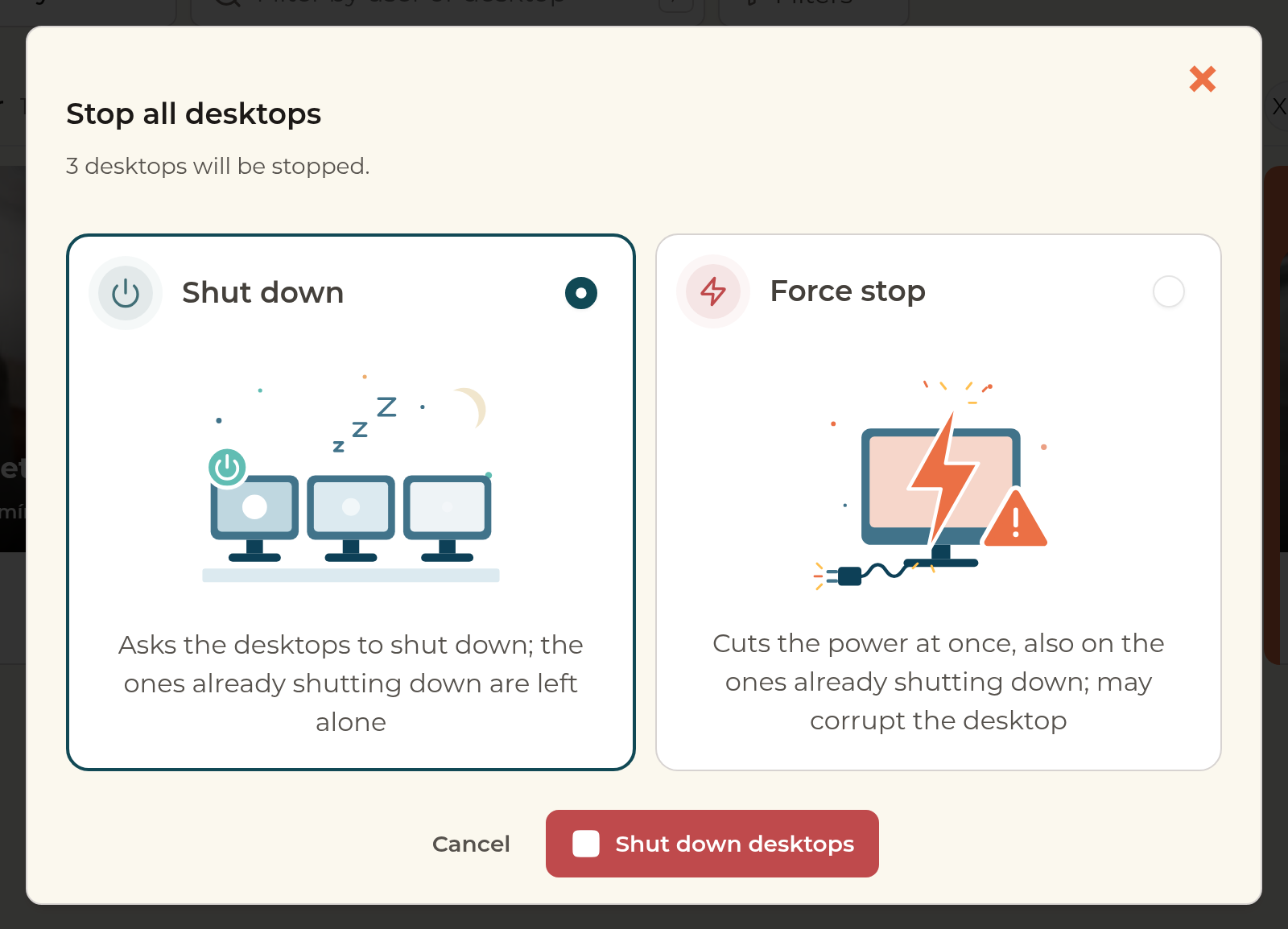
The red button Stop all in the toolbar opens a confirmation window that affects all desktops in the deployment, not just the filtered ones.
- Click Stop all.
- In the «Stop all desktops» window, select the mode:
- Shut down: requests shutdown for started desktops; those already shutting down are left as they are.
- Force stop: cuts power immediately, including those already shutting down; may corrupt the desktop.
- Confirm with Shut down desktops or Force stop desktops (or Cancel).
The window indicates how many desktops will be stopped (for example, «3 desktops will be stopped»); the count depends on the selected mode.
Forced shutdown is destructive
Forced shutdown is equivalent to cutting power and may corrupt the user's desktop. It is the only option if a desktop ignores the shutdown request.
Conditions and messages
- The button is disabled if there are no desktops to stop. The tooltip says «There are no started desktops now» or, if there are any shutting down, «The desktops are stopping». While shutdowns are in progress, the button shows a loading icon.
- Desktops already shutting down count as stoppable, but only a forced shutdown affects them. If all active desktops are shutting down, the Shut down mode is disabled («No desktop is started») and Force stop is preselected.
- While the operation is running, the window shows «Stopping the desktops…».
- If it fails: «Could not stop the deployment desktops» (inside the window if it is open; otherwise, as a notification).
- On the server, the operation is
PUT /item/deployment/{deployment_id}/stopwith the bodyforce; it returns 404 if the deployment has no desktops. You must be the owner, co-owner, or administrator of the deployment (or a manager of the same category).
Development details
For those who develop or integrate IsardVDI: where in the code each element of this section is located, since which version it has been available, which API operation it calls, and what messages it may return.
- New interface · file
components/modal/StopAllDesktopsModal.vue:158· interface text (translation key)components.stop-all-desktops-modal.confirm.force- since v17.35.2 (2026-09-09,
c71bfb93b6) - on click:
emit('confirm', mode === 'force')
- since v17.35.2 (2026-09-09,
- New interface · file
components/modal/StopAllDesktopsModal.vue:159· interface text (translation key)components.stop-all-desktops-modal.confirm.graceful- since v17.35.2 (2026-09-09,
c71bfb93b6) - on click:
emit('confirm', mode === 'force')
- since v17.35.2 (2026-09-09,
- New interface · file
views/deployments/DeploymentVideowallView.vue:492· interface text (translation key)views.deployment.stop-all.stopping-tooltip- since v17.35.0 (2026-09-07,
8939ec8441) - on click:
openStopAllModal
- since v17.35.0 (2026-09-07,
- New interface · file
views/deployments/DeploymentVideowallView.vue:493· interface text (translation key)views.deployment.stop-all.no-started-tooltip- since v17.35.0 (2026-09-07,
8939ec8441) - on click:
openStopAllModal
- since v17.35.0 (2026-09-07,
- New interface · file
components/modal/StopAllDesktopsModal.vue:147· interface text (translation key)components.stop-all-desktops-modal.cancel- since v17.35.0 (2026-09-07,
8939ec8441) - on click:
emit('close')
- since v17.35.0 (2026-09-07,
- New interface · file
views/deployments/DeploymentVideowallView.vue:483· interface text (translation key)views.deployment.buttons.stop-all- since v17.0.0 (2026-04-24,
f31b874d89) - on click:
openStopAllModal
- since v17.0.0 (2026-04-24,
Commit code d90222c5.
Review screens
This feature is only available in the new interface (new interface).
The main button View live screens opens the videowall viewer with all desktops displayed simultaneously in mosaic mode. If search or filters are active, the button reads Show {n} filtered screens and only opens the filtered ones. Only viewing is possible: the keyboard and mouse do not reach the desktops.
The viewer has two layouts:
- Mosaic: all screens at once, viewing only. The tile size can be chosen (large, medium or small). A click on a desktop switches to the single layout.
- Single: one desktop in large view. Navigate with Previous desktop / Next desktop (or the ← → arrow keys, in view mode), pick one from the Go to a desktop list, or view it in full screen.
The Viewer mode is selected from the top bar:
| Mode | Effect |
|---|---|
| View (default) | View only: the keyboard and mouse do not reach the desktop. |
| Control | The keyboard and mouse can be used on the user's desktop. |
Control over a user's desktop
In Control mode, actions happen on the user's real desktop. In this mode, Escape and clicks outside the window do not close the viewer, and the keyboard arrow keys go to the desktop instead of switching desktops. In the mosaic the mode is always "view" («The mosaic is view only: click a desktop to control it»). The amber color of the mode button, of the warning and a brief blink of the frame are a reminder that control mode is active.
Conditions and messages
- The button is disabled if there are no desktops to display.
- The viewer only cycles through the desktops that can be viewed (started), plus the one that is open even if it stops. While connecting: «Connecting to the desktop…»; if it cannot connect, «Viewer not available».
- Pin to the side to keep watching it: up to 10 desktops can be pinned («You can pin up to 10 desktops»); pinned desktops keep streaming constantly. They are removed with Unpin; the panel can be collapsed.
- If the mosaic has active filters, it displays «Filtered: showing 4 of 12» (with the actual count) and the link Show all.
- When changing modes, a brief notice appears: «View mode: keyboard and mouse don't reach the desktop» or «Control mode: you are using the user's desktop».
- The videowall does not work with RDP viewers.
Details for development
For those who develop or integrate IsardVDI: where in the code each element of this section is located, from which version it is available, which API operation it calls, and what messages it can return.
- New interface · file
views/deployments/DeploymentVideowallView.vue:509· interface text (translation key)views.deployment-videowall.review.filtered- since v17.71.0 (2026-10-09,
ea1ac95ea2) - on click:
showAll
- since v17.71.0 (2026-10-09,
- New interface · file
views/deployments/DeploymentVideowallView.vue:510· interface text (translation key)views.deployment-videowall.review.all- since v17.71.0 (2026-10-09,
ea1ac95ea2) - on click:
showAll
- since v17.71.0 (2026-10-09,
- New interface · file
views/deployments/DeploymentVideowallView.vue:518· interface text (translation key)views.deployment-videowall.review.filtered-hint- since v17.71.0 (2026-10-09,
ea1ac95ea2) - on click:
showAll
- since v17.71.0 (2026-10-09,
- New interface · file
views/deployments/DeploymentVideowallView.vue:519· interface text (translation key)views.deployment-videowall.review.all-hint- since v17.71.0 (2026-10-09,
ea1ac95ea2) - on click:
showAll
- since v17.71.0 (2026-10-09,
- New interface · file
components/deployments/videowall-viewer/VideowallViewerModal.vue:380· interface text (translation key)views.deployment-videowall.viewer.filtered.clear- since v17.71.0 (2026-10-09,
7ae69f3727) - on click:
emit('clearFilters')
- since v17.71.0 (2026-10-09,
- New interface · file
components/deployments/videowall-viewer/VideowallViewerModal.vue:321· interface text (translation key)views.view-deployment.sections.viewer.actions.close- since v17.17.0 (2026-04-23,
f2160e6e11) - on click:
close
- since v17.17.0 (2026-04-23,
Commit code d90222c5.
Expand desktop
This feature is only available in the new interface (new interface).
The Expand button on a card (or row) opens the viewer directly in the single layout on that desktop, in the current mode (View by default). From there you can switch to mosaic, pin it to the side, change the mode or go to another desktop.
Conditions and messages
- Expand is only available for desktops that can be viewed (started). Otherwise, the tooltip says «Viewer not available».
- When the viewer is open, the background screen previews are paused.
- It closes with Close viewer; you can also maximize or restore the size.
Development details
For those who develop or integrate IsardVDI: where each element of this section is in the code, since which version it has been available, which API operation it calls, and what messages it can return.
- New interface · file
views/deployments/DeploymentVideowallView.vue:664· interface text (translation key)components.desktops.desktop-card.actions.expand- since v17.71.0 (2026-10-09,
9ea1664bdb) - on click:
viewerDesktopId = dktp.id
- since v17.71.0 (2026-10-09,
- New interface · file
components/deployments/videowall-viewer/VideowallViewerModal.vue:207· interface text (translation key)views.deployment-videowall.viewer.mosaic.title- since v17.71.0 (2026-10-09,
7ae69f3727)
- since v17.71.0 (2026-10-09,
- New interface · file
components/deployments/videowall-viewer/VideowallViewerModal.vue:260· interface text (translation key)views.deployment-videowall.viewer.pinned.badge- since v17.71.0 (2026-10-09,
7ae69f3727)
- since v17.71.0 (2026-10-09,
- New interface · file
components/deployments/videowall-viewer/VideowallViewerModal.vue:359· interface text (translation key)views.deployment-videowall.viewer.filtered.label- since v17.71.0 (2026-10-09,
7ae69f3727)
- since v17.71.0 (2026-10-09,
- New interface · file
components/deployments/videowall-viewer/VideowallViewerModal.vue:369· interface text (translation key)views.deployment-videowall.viewer.filtered.showing- since v17.71.0 (2026-10-09,
7ae69f3727)
- since v17.71.0 (2026-10-09,
- New interface · file
components/deployments/videowall-viewer/VideowallViewerModal.vue:380· interface text (translation key)views.deployment-videowall.viewer.filtered.clear- since v17.71.0 (2026-10-09,
7ae69f3727) - on click:
emit('clearFilters')
- since v17.71.0 (2026-10-09,
- New interface · file
components/viewer-select/ViewerSelect.vue:192· interface text (translation key)viewers.tooltip-dismiss- since v17.0.0 (2026-04-24,
f31b874d89) - on click:
selectViewer(selectedViewer)
- since v17.0.0 (2026-04-24,
- New interface · file
components/deployments/videowall-viewer/VideowallViewerModal.vue:321· interface text (translation key)views.view-deployment.sections.viewer.actions.close- since v17.17.0 (2026-04-23,
f2160e6e11) - on click:
close
- since v17.17.0 (2026-04-23,
Commit code d90222c5.
Desktop details
This feature is only available in the new interface (new interface).
The Details button on the card overlay («Open the full details modal») opens a window with the full content, which is longer than what fits on the card. Depending on the active overlay, it displays the desktop information or its networks (see the following sections).
Development details
For those who develop or integrate IsardVDI: where in the code each element of this section is located, from which version it is available, which API operation it calls, and what messages it may return.
- New interface · file
components/desktop-card/DesktopCard.vue:228· interface text (translation key)components.desktops.desktop-card.overlay.expand- since v17.0.0 (2026-07-09,
48700c853f) - on click:
emit('showNetworksModal')
- since v17.0.0 (2026-07-09,
- New interface · file
components/desktop-card/DesktopCard.vue:232· interface text (translation key)components.desktops.desktop-card.overlay.expand-tooltip- since v17.0.0 (2026-07-09,
48700c853f) - on click:
emit('showNetworksModal')
- since v17.0.0 (2026-07-09,
- New interface · file
components/desktops/DesktopNetworksModal.vue:293· interface text (translation key)components.desktop-networks-modal.fields.ip- since v17.0.0 (2026-06-23,
d21d161d55)
- since v17.0.0 (2026-06-23,
- New interface · file
components/desktops/DesktopNetworksModal.vue:328· interface text (translation key)components.desktop-networks-modal.no-ip- since v17.0.0 (2026-06-23,
d21d161d55)
- since v17.0.0 (2026-06-23,
- New interface · file
components/desktops/DesktopNetworksModal.vue:173· interface text (translation key)components.desktop-networks-modal.title- since v17.0.0 (2026-04-24,
f31b874d89)
- since v17.0.0 (2026-04-24,
- New interface · file
components/desktops/DesktopNetworksModal.vue:305· interface text (translation key)components.desktops.desktop-card.status.waitingip.text- since v17.0.0 (2026-04-24,
f31b874d89)
- since v17.0.0 (2026-04-24,
- New interface · file
components/desktops/DesktopNetworksModal.vue:234· interface text (translation key)components.desktop-networks-modal.empty- since v17.17.0 (2026-04-23,
f2160e6e11)
- since v17.17.0 (2026-04-23,
- New interface · file
components/desktops/DesktopNetworksModal.vue:203· interface text (translation key)components.desktop-networks-modal.error- since v17.7.0 (2026-04-17,
87a6881de3)
- since v17.7.0 (2026-04-17,
Commit code d90222c5.
Desktop information
This feature is only available in the new interface (new interface).
The Info action in the card (or row) menu opens the desktop information window: status, template, description, hardware, viewers and networks.
Conditions and messages
- Each deployment has a single videowall; there is no list of videowalls to manage.
- The same roles as for the videowall have access: advanced, manager and administrator, on the deployments they manage.
Development details
For those who develop or integrate IsardVDI: where each element of this section is located in the code, from which version it is available, which API operation it calls, and what messages it can return.
- New interface · file
components/desktops/DesktopBastionInfoModal.vue:393· interface text (translation key)common.actions.save- since v17.46.1 (2026-09-29,
80bfbcca4f) - on click:
submits the form (onSubmit)
- since v17.46.1 (2026-09-29,
- New interface · file
components/desktops/DesktopBastionInfoModal.vue:357· interface text (translation key)components.domain.access.bastion.custom-domains.label- since v17.3.0 (2026-07-21,
bcc6683aea)
- since v17.3.0 (2026-07-21,
- New interface · file
components/desktops/DesktopBastionInfoModal.vue:258· interface text (translation key)components.bastion-info-modal.error.title- since v17.0.0 (2026-07-09,
48700c853f)
- since v17.0.0 (2026-07-09,
- New interface · file
components/desktops/DesktopBastionInfoModal.vue:261· interface text (translation key)components.bastion-info-modal.error-loading-user-config- since v17.0.0 (2026-07-09,
48700c853f)
- since v17.0.0 (2026-07-09,
- New interface · file
components/desktops/DesktopBastionInfoModal.vue:265· interface text (translation key)components.bastion-info-modal.error-loading-bastion-data- since v17.0.0 (2026-07-09,
48700c853f)
- since v17.0.0 (2026-07-09,
- New interface · file
components/desktops/DesktopBastionInfoModal.vue:278· interface text (translation key)components.bastion-info-modal.no-bastion-configured- since v17.0.0 (2026-07-09,
48700c853f)
- since v17.0.0 (2026-07-09,
- New interface · file
components/desktops/DesktopBastionInfoModal.vue:281· interface text (translation key)components.bastion-info-modal.no-bastion-configured-description- since v17.0.0 (2026-07-09,
48700c853f)
- since v17.0.0 (2026-07-09,
- New interface · file
components/desktops/DesktopBastionInfoModal.vue:465· interface text (translation key)components.domain.access.bastion.ssh.authorized-keys.others-label- since v17.0.0 (2026-07-09,
48700c853f)
- since v17.0.0 (2026-07-09,
- New interface · file
components/desktops-data-table/DesktopsDataTable.vue:299· interface text (translation key)components.desktops.desktop-card.actions.info- since v17.0.0 (2026-04-24,
f31b874d89) - on click:
emit('showInfoModal', desktop)
- since v17.0.0 (2026-04-24,
- New interface · file
components/desktops/DesktopBastionInfoModal.vue:234· interface text (translation key)components.bastion-info-modal.title- since v17.0.0 (2026-04-24,
f31b874d89)
- since v17.0.0 (2026-04-24,
- New interface · file
components/desktops/DesktopBastionInfoModal.vue:291· interface text (translation key)components.bastion-info-modal.fields.target-id.title- since v17.0.0 (2026-04-24,
f31b874d89)
- since v17.0.0 (2026-04-24,
- New interface · file
components/desktops/DesktopBastionInfoModal.vue:312· interface text (translation key)components.domain.access.bastion.http-https.label- since v17.0.0 (2026-04-24,
f31b874d89)
- since v17.0.0 (2026-04-24,
- New interface · file
components/desktops/DesktopBastionInfoModal.vue:373· interface text (translation key)components.domain.access.bastion.http-https.custom-domains.label- since v17.0.0 (2026-04-24,
f31b874d89)
- since v17.0.0 (2026-04-24,
- New interface · file
components/desktops/DesktopBastionInfoModal.vue:384· interface text (translation key)components.domain.access.bastion.http-https.custom-domains.placeholder- since v17.0.0 (2026-04-24,
f31b874d89)
- since v17.0.0 (2026-04-24,
- New interface · file
components/desktops/DesktopBastionInfoModal.vue:406· interface text (translation key)components.domain.access.bastion.http-https.custom-domains.less-details- since v17.0.0 (2026-04-24,
f31b874d89) - on click:
bastionModalDnsAlertOpen = !bastionModalDnsAlertOpen
- since v17.0.0 (2026-04-24,
- New interface · file
components/desktops/DesktopBastionInfoModal.vue:407· interface text (translation key)components.domain.access.bastion.http-https.custom-domains.more-details- since v17.0.0 (2026-04-24,
f31b874d89) - on click:
bastionModalDnsAlertOpen = !bastionModalDnsAlertOpen
- since v17.0.0 (2026-04-24,
- New interface · file
components/desktops/DesktopBastionInfoModal.vue:417· interface text (translation key)components.domain.access.bastion.http-https.custom-domains.alert.title- since v17.0.0 (2026-04-24,
f31b874d89)
- since v17.0.0 (2026-04-24,
- New interface · file
components/desktops/DesktopBastionInfoModal.vue:450· interface text (translation key)components.domain.access.bastion.ssh.label- since v17.0.0 (2026-04-24,
f31b874d89)
- since v17.0.0 (2026-04-24,
- New interface · file
components/desktops/DesktopBastionInfoModal.vue:504· interface text (translation key)components.domain.access.bastion.ssh.authorized-keys.placeholder- since v17.0.0 (2026-04-24,
f31b874d89)
- since v17.0.0 (2026-04-24,
- New interface · file
components/desktops/DesktopBastionInfoModal.vue:471· interface text (translation key)components.domain.access.bastion.ssh.authorized-keys.own-key.missing.title - New interface · file
components/desktops/DesktopBastionInfoModal.vue:490· interface text (translation key)components.domain.access.bastion.ssh.authorized-keys.own-key.missing.button- on click:
router.push({ name: 'profile', query: { open: 'ssh' } }) - call:
navigation to the «profile» route
- on click:
- New interface · file
components/desktops/DesktopBastionInfoModal.vue:475· interface text (translation key)components.domain.access.bastion.ssh.authorized-keys.own-key.missing.description
Commit code d90222c5.
Desktop Networks
This feature is only available in the new interface (new interface).
The Networks action on the card opens the desktop's Networks window. For each interface, it displays the ID, MAC, name, and IP address.
Conditions and messages
- «Loading network information…» while querying.
- «No networks attached to this desktop» if none are found.
- «Could not load network information» if the query fails.
- For the WireGuard network, if the desktop does not yet have an IP, «No IP assigned» is displayed (or the IP waiting state if the desktop is in Waiting for IP).
Development details
For those developing or integrating IsardVDI: where in the code each element of this section is located, from which version it is available, which API operation it calls, and what messages it may return.
- New interface · file
components/desktops-data-table/DesktopsDataTable.vue:313· interface text (translation key)components.desktops.desktop-card.actions.networks- since v17.0.0 (2026-07-09,
48700c853f) - on click:
emit('showNetworksModal', desktop)
- since v17.0.0 (2026-07-09,
- New interface · file
components/desktops/DesktopNetworksModal.vue:293· interface text (translation key)components.desktop-networks-modal.fields.ip- since v17.0.0 (2026-06-23,
d21d161d55)
- since v17.0.0 (2026-06-23,
- New interface · file
components/desktops/DesktopNetworksModal.vue:328· interface text (translation key)components.desktop-networks-modal.no-ip- since v17.0.0 (2026-06-23,
d21d161d55)
- since v17.0.0 (2026-06-23,
- New interface · file
components/desktops/DesktopNetworksModal.vue:173· interface text (translation key)components.desktop-networks-modal.title- since v17.0.0 (2026-04-24,
f31b874d89)
- since v17.0.0 (2026-04-24,
- New interface · file
components/desktops/DesktopNetworksModal.vue:305· interface text (translation key)components.desktops.desktop-card.status.waitingip.text- since v17.0.0 (2026-04-24,
f31b874d89)
- since v17.0.0 (2026-04-24,
- New interface · file
components/desktops/DesktopNetworksModal.vue:234· interface text (translation key)components.desktop-networks-modal.empty- since v17.17.0 (2026-04-23,
f2160e6e11)
- since v17.17.0 (2026-04-23,
- New interface · file
components/desktops/DesktopNetworksModal.vue:203· interface text (translation key)components.desktop-networks-modal.error- since v17.7.0 (2026-04-17,
87a6881de3)
- since v17.7.0 (2026-04-17,
Commit code d90222c5.
Bastion access
This feature is only available in the new interface (new interface).
The Bastion access (HTTP / HTTPS / SSH) action on the card opens the «Bastion information for desktop 'name'» window. It shows the HTTP/HTTPS URL, the SSH connection (to copy), the Bastion target ID and, if HTTP is active, the Custom domain name (a CNAME record in your own DNS is required) and the Authorized SSH Keys.
Conditions and messages
- «Bastion is not enabled for this desktop»: edit the desktop and enable HTTP/HTTPS or SSH access.
- «Could not load bastion access» / «Error loading bastion data» if the query fails.
- The custom domain and SSH keys can only be saved when the window is editable; on success: «Custom domain updated successfully» or «Authorized SSH keys updated successfully».
Development details
For those who develop or integrate IsardVDI: where in the code each element of this section is located, from which version it has been available, which API operation it calls, and what messages it can return.
- New interface · file
components/desktops/DesktopBastionInfoModal.vue:393· interface text (translation key)common.actions.save- since v17.46.1 (2026-09-29,
80bfbcca4f) - on click:
submits the form (onSubmit)
- since v17.46.1 (2026-09-29,
- New interface · file
views/ProfileView.vue:359· interface text (translation key)views.profile.security.actions.vpn- since v17.27.0 (2026-08-07,
3b9dcd4652) - on click:
showVpnModal = true
- since v17.27.0 (2026-08-07,
- New interface · file
components/desktops-data-table/DesktopsDataTable.vue:329· interface text (translation key)components.desktops.desktop-card.actions.bastion-access- since v17.0.0 (2026-07-09,
48700c853f) - on click:
emit('showBastionModal', desktop)
- since v17.0.0 (2026-07-09,
- New interface · file
views/ProfileView.vue:347· interface text (translation key)views.profile.security.actions.ssh-key- since v17.0.0 (2026-07-09,
48700c853f) - on click:
showSshKeyModal = true
- since v17.0.0 (2026-07-09,
- New interface · file
components/profile/SshPublicKeyModal.vue:117· interface text (translation key)components.profile.ssh-key-modal.title- since v17.0.0 (2026-07-09,
48700c853f)
- since v17.0.0 (2026-07-09,
- New interface · file
components/profile/SshPublicKeyModal.vue:124· interface text (translation key)components.profile.ssh-key-modal.description- since v17.0.0 (2026-07-09,
48700c853f)
- since v17.0.0 (2026-07-09,
- New interface · file
components/profile/SshPublicKeyModal.vue:131· interface text (translation key)components.profile.ssh-key-modal.security-note- since v17.0.0 (2026-07-09,
48700c853f)
- since v17.0.0 (2026-07-09,
- New interface · file
components/profile/SshPublicKeyModal.vue:149· interface text (translation key)components.profile.ssh-key-modal.alert.error-title- since v17.0.0 (2026-07-09,
48700c853f)
- since v17.0.0 (2026-07-09,
- New interface · file
components/profile/SshPublicKeyModal.vue:168· interface text (translation key)components.profile.ssh-key-modal.placeholder- since v17.0.0 (2026-07-09,
48700c853f)
- since v17.0.0 (2026-07-09,
- New interface · file
components/profile/SshPublicKeyModal.vue:190· interface text (translation key)components.profile.ssh-key-modal.buttons.remove- since v17.0.0 (2026-07-09,
48700c853f) - on click:
handleRemove
- since v17.0.0 (2026-07-09,
- New interface · file
components/profile/SshPublicKeyModal.vue:199· interface text (translation key)components.profile.ssh-key-modal.buttons.save- since v17.0.0 (2026-07-09,
48700c853f) - on click:
form.handleSubmit
- since v17.0.0 (2026-07-09,
- New interface · file
components/desktops/DesktopBastionInfoModal.vue:406· interface text (translation key)components.domain.access.bastion.http-https.custom-domains.less-details- since v17.0.0 (2026-04-24,
f31b874d89) - on click:
bastionModalDnsAlertOpen = !bastionModalDnsAlertOpen
- since v17.0.0 (2026-04-24,
- New interface · file
components/desktops/DesktopBastionInfoModal.vue:407· interface text (translation key)components.domain.access.bastion.http-https.custom-domains.more-details- since v17.0.0 (2026-04-24,
f31b874d89) - on click:
bastionModalDnsAlertOpen = !bastionModalDnsAlertOpen
- since v17.0.0 (2026-04-24,
- New interface · file
views/ProfileView.vue:215· interface text (translation key)views.profile.personal-info.title- since v17.0.0 (2026-04-24,
f31b874d89)
- since v17.0.0 (2026-04-24,
- New interface · file
views/ProfileView.vue:234· interface text (translation key)views.profile.personal-info.fields.name- since v17.0.0 (2026-04-24,
f31b874d89)
- since v17.0.0 (2026-04-24,
- New interface · file
views/ProfileView.vue:245· interface text (translation key)views.profile.personal-info.fields.email- since v17.0.0 (2026-04-24,
f31b874d89)
- since v17.0.0 (2026-04-24,
- New interface · file
views/ProfileView.vue:266· interface text (translation key)views.profile.email-verified- since v17.0.0 (2026-04-24,
f31b874d89)
- since v17.0.0 (2026-04-24,
- New interface · file
views/ProfileView.vue:274· interface text (translation key)views.profile.email-not-verified- since v17.0.0 (2026-04-24,
f31b874d89)
- since v17.0.0 (2026-04-24,
- New interface · file
views/ProfileView.vue:282· interface text (translation key)views.profile.personal-info.fields.language- since v17.0.0 (2026-04-24,
f31b874d89)
- since v17.0.0 (2026-04-24,
- New interface · file
views/ProfileView.vue:299· interface text (translation key)views.profile.security.title- since v17.0.0 (2026-04-24,
f31b874d89)
- since v17.0.0 (2026-04-24,
- New interface · file
views/ProfileView.vue:311· interface text (translation key)views.profile.security.actions.change-password- since v17.0.0 (2026-04-24,
f31b874d89) - on click:
showPasswordModal = true
- since v17.0.0 (2026-04-24,
- New interface · file
views/ProfileView.vue:323· interface text (translation key)views.profile.security.actions.verify-email- since v17.0.0 (2026-04-24,
f31b874d89) - on click:
showEmailVerificationModal = true
- since v17.0.0 (2026-04-24,
- New interface · file
views/ProfileView.vue:335· interface text (translation key)views.profile.security.actions.api-key- since v17.0.0 (2026-04-24,
f31b874d89) - on click:
showApiKeyModal = true
- since v17.0.0 (2026-04-24,
- New interface · file
views/ProfileView.vue:372· interface text (translation key)views.profile.information.title- since v17.0.0 (2026-04-24,
f31b874d89)
- since v17.0.0 (2026-04-24,
- New interface · file
views/ProfileView.vue:377· interface text (translation key)views.profile.information.fields.username- since v17.0.0 (2026-04-24,
f31b874d89)
- since v17.0.0 (2026-04-24,
- New interface · file
views/ProfileView.vue:385· interface text (translation key)views.profile.information.fields.authentication- since v17.0.0 (2026-04-24,
f31b874d89)
- since v17.0.0 (2026-04-24,
- New interface · file
views/ProfileView.vue:393· interface text (translation key)views.profile.information.fields.category- since v17.0.0 (2026-04-24,
f31b874d89)
- since v17.0.0 (2026-04-24,
- New interface · file
views/ProfileView.vue:401· interface text (translation key)views.profile.information.fields.group- since v17.0.0 (2026-04-24,
f31b874d89)
- since v17.0.0 (2026-04-24,
- New interface · file
views/ProfileView.vue:410· interface text (translation key)views.profile.information.fields.secondary-groups- since v17.0.0 (2026-04-24,
f31b874d89)
- since v17.0.0 (2026-04-24,
- New interface · file
views/ProfileView.vue:419· interface text (translation key)views.profile.information.fields.role- since v17.0.0 (2026-04-24,
f31b874d89)
- since v17.0.0 (2026-04-24,
- New interface · file
views/ProfileView.vue:435· interface text (translation key)views.profile.information.actions.view-quota- since v17.0.0 (2026-04-24,
f31b874d89) - on click:
showQuotaModal = true
- since v17.0.0 (2026-04-24,
- New interface · file
views/ProfileView.vue:450· interface text (translation key)views.profile.migrations.title- since v17.0.0 (2026-04-24,
f31b874d89)
- since v17.0.0 (2026-04-24,
- New interface · file
views/ProfileView.vue:462· interface text (translation key)views.profile.migrations.actions.export-user- since v17.0.0 (2026-04-24,
f31b874d89) - on click:
router.push({ name: 'export-user' }) - call:
navigation to the «export-user» route
- since v17.0.0 (2026-04-24,
- New interface · file
views/ProfileView.vue:473· interface text (translation key)views.profile.migrations.actions.import-user- since v17.0.0 (2026-04-24,
f31b874d89) - on click:
showImportUserModal = true
- since v17.0.0 (2026-04-24,
- New interface · file
views/ProfileView.vue:486· interface text (translation key)views.profile.storage.title- since v17.0.0 (2026-04-24,
f31b874d89)
- since v17.0.0 (2026-04-24,
- New interface · file
views/ProfileView.vue:490· interface text (translation key)views.profile.storage.fields.user-storage-link- since v17.0.0 (2026-04-24,
f31b874d89)
- since v17.0.0 (2026-04-24,
- New interface · file
views/ProfileView.vue:515· interface text (translation key)views.profile.storage.actions.manage-user-storage- since v17.0.0 (2026-04-24,
f31b874d89)
- since v17.0.0 (2026-04-24,
- New interface · file
views/ProfileView.vue:527· interface text (translation key)views.profile.personal-info.fields.profile-image- since v17.0.0 (2026-04-24,
f31b874d89)
- since v17.0.0 (2026-04-24,
- New interface · file
views/ProfileView.vue:536· interface text (translation key)views.profile.no-data- since v17.0.0 (2026-04-24,
f31b874d89)
- since v17.0.0 (2026-04-24,
- New interface · file
components/profile/EmailVerificationModal.vue:113· interface text (translation key)components.profile.email-verification-modal.title- since v17.0.0 (2026-04-24,
f31b874d89)
- since v17.0.0 (2026-04-24,
- New interface · file
components/profile/EmailVerificationModal.vue:126· interface text (translation key)components.profile.email-verification-modal.description- since v17.0.0 (2026-04-24,
f31b874d89)
- since v17.0.0 (2026-04-24,
- New interface · file
components/profile/EmailVerificationModal.vue:134· interface text (translation key)components.profile.email-verification-modal.email-label- since v17.0.0 (2026-04-24,
f31b874d89)
- since v17.0.0 (2026-04-24,
- New interface · file
components/profile/EmailVerificationModal.vue:143· interface text (translation key)components.profile.email-verification-modal.email-placeholder- since v17.0.0 (2026-04-24,
f31b874d89)
- since v17.0.0 (2026-04-24,
- New interface · file
components/profile/EmailVerificationModal.vue:163· interface text (translation key)components.profile.email-verification-modal.buttons.cancel- since v17.0.0 (2026-04-24,
f31b874d89) - on click:
handleClose
- since v17.0.0 (2026-04-24,
- New interface · file
components/profile/EmailVerificationModal.vue:171· interface text (translation key)components.profile.email-verification-modal.buttons.verify- since v17.0.0 (2026-04-24,
f31b874d89) - on click:
form.handleSubmit
- since v17.0.0 (2026-04-24,
- New interface · file
components/profile/PasswordModal.vue:144· interface text (translation key)components.profile.password-modal.title- since v17.0.0 (2026-04-24,
f31b874d89)
- since v17.0.0 (2026-04-24,
- New interface · file
components/profile/PasswordModal.vue:167· interface text (translation key)components.profile.password-modal.errors.required- since v17.0.0 (2026-04-24,
f31b874d89)
- since v17.0.0 (2026-04-24,
- New interface · file
components/profile/PasswordModal.vue:173· interface text (translation key)components.profile.password-modal.current-password.label- since v17.0.0 (2026-04-24,
f31b874d89)
- since v17.0.0 (2026-04-24,
- New interface · file
components/profile/PasswordModal.vue:182· interface text (translation key)components.profile.password-modal.current-password.placeholder- since v17.0.0 (2026-04-24,
f31b874d89)
- since v17.0.0 (2026-04-24,
- New interface · file
components/profile/PasswordModal.vue:199· interface text (translation key)components.profile.password-modal.errors.password_character_length- since v17.0.0 (2026-04-24,
f31b874d89)
- since v17.0.0 (2026-04-24,
- New interface · file
components/profile/PasswordModal.vue:206· interface text (translation key)components.profile.password-modal.errors.password_uppercase- since v17.0.0 (2026-04-24,
f31b874d89)
- since v17.0.0 (2026-04-24,
- New interface · file
components/profile/PasswordModal.vue:214· interface text (translation key)components.profile.password-modal.errors.password_lowercase- since v17.0.0 (2026-04-24,
f31b874d89)
- since v17.0.0 (2026-04-24,
- New interface · file
components/profile/PasswordModal.vue:220· interface text (translation key)components.profile.password-modal.errors.password_digits- since v17.0.0 (2026-04-24,
f31b874d89)
- since v17.0.0 (2026-04-24,
- New interface · file
components/profile/PasswordModal.vue:241· interface text (translation key)components.profile.password-modal.new-password.label- since v17.0.0 (2026-04-24,
f31b874d89)
- since v17.0.0 (2026-04-24,
- New interface · file
components/profile/PasswordModal.vue:249· interface text (translation key)components.profile.password-modal.new-password.placeholder- since v17.0.0 (2026-04-24,
f31b874d89)
- since v17.0.0 (2026-04-24,
- New interface · file
components/profile/PasswordModal.vue:267· interface text (translation key)components.profile.password-modal.confirm-new-password.label- since v17.0.0 (2026-04-24,
f31b874d89)
- since v17.0.0 (2026-04-24,
- New interface · file
components/profile/PasswordModal.vue:276· interface text (translation key)components.profile.password-modal.confirm-new-password.placeholder- since v17.0.0 (2026-04-24,
f31b874d89)
- since v17.0.0 (2026-04-24,
- New interface · file
components/profile/PasswordModal.vue:298· interface text (translation key)components.profile.password-modal.buttons.cancel- since v17.0.0 (2026-04-24,
f31b874d89) - on click:
handleCancel
- since v17.0.0 (2026-04-24,
- New interface · file
components/profile/PasswordModal.vue:306· interface text (translation key)components.profile.password-modal.buttons.update- since v17.0.0 (2026-04-24,
f31b874d89) - on click:
submits the form (onSubmit)
- since v17.0.0 (2026-04-24,
- New interface · file
components/profile/PasswordModal.vue:192· interface text (translation key)components.profile.password-modal.errors.password_special_characters- since v17.0.0 (2026-04-24,
f31b874d89)
- since v17.0.0 (2026-04-24,
- New interface · file
components/desktops/DesktopBastionInfoModal.vue:490· interface text (translation key)components.domain.access.bastion.ssh.authorized-keys.own-key.missing.button- on click:
router.push({ name: 'profile', query: { open: 'ssh' } }) - call:
navigation to the «profile» route
- on click:
- New interface · file
components/profile/PasswordModal.vue:158· interface text (translation key)components.profile.password-modal.errors. - New interface · file
components/profile/SshPublicKeyModal.vue:160· interface text (translation key)components.profile.ssh-key-modal.label
Commit code d90222c5.
Go back
This feature is only available in the new interface (new interface).
The Go back button, located at the top left, returns to the deployment page. It does not undo any action: it is a navigation action. When the header scrolls out of view, the toolbar displays a compact version of the button (arrow only) and the deployment name.
Development details
For those who develop or integrate IsardVDI: where each element of this section is located in the code, since which version it has been available, when it is displayed, which API operation it calls, and what messages it may return.
- New interface · file
views/deployments/DeploymentVideowallView.vue:343· interface text (translation key)layouts.single-page.go-back- since v17.0.0 (2026-04-24,
f31b874d89) - on click:
router.push({ name: 'deployment', params: { deploymentId } }) - calls:
navigation to the «deployment» route
- since v17.0.0 (2026-04-24,
Commit code 5f15ed22.