LDAP authentication
Roles with access
Only administrators have access to this feature.
LDAP authentication validates the username and password against a centralized directory (OpenLDAP, Active Directory, 389 Directory Server…). The user does not need to create any new credential: they use their organization's one.
Besides validating credentials, the LDAP provider can deduce the category, the group and the role from the directory attributes. This is called self-registration, and it saves having to create every user by hand.
LDAP uses the same form as local authentication
LDAP does not add any button to the login screen: it shares the username and password form with the local provider. When both are enabled, IsardVDI tries one provider first and then the other, transparently for the user.
Requirements
- An LDAP server reachable from the
isard-authenticationcontainer. - A service account (username and password) with read permission on the branches holding the users and, if role mapping is to be used, on the branches holding the groups.
- Knowing the directory schema: which attribute holds the identifier, the name, the email, the department and the group membership.
Configuration
In the LDAP panel, the Update config link opens the configuration window. When Enabled is checked, the rest of the form appears.
The form unfolds progressively
Fields appear as others are enabled, so that options with no effect are not shown:
- A Regex … field only appears when its Field … has a value.
- Field Category and Regex Category only appear with Guess Category checked.
- The whole groups and roles block only appears with Auto Register checked.
Connection to the directory
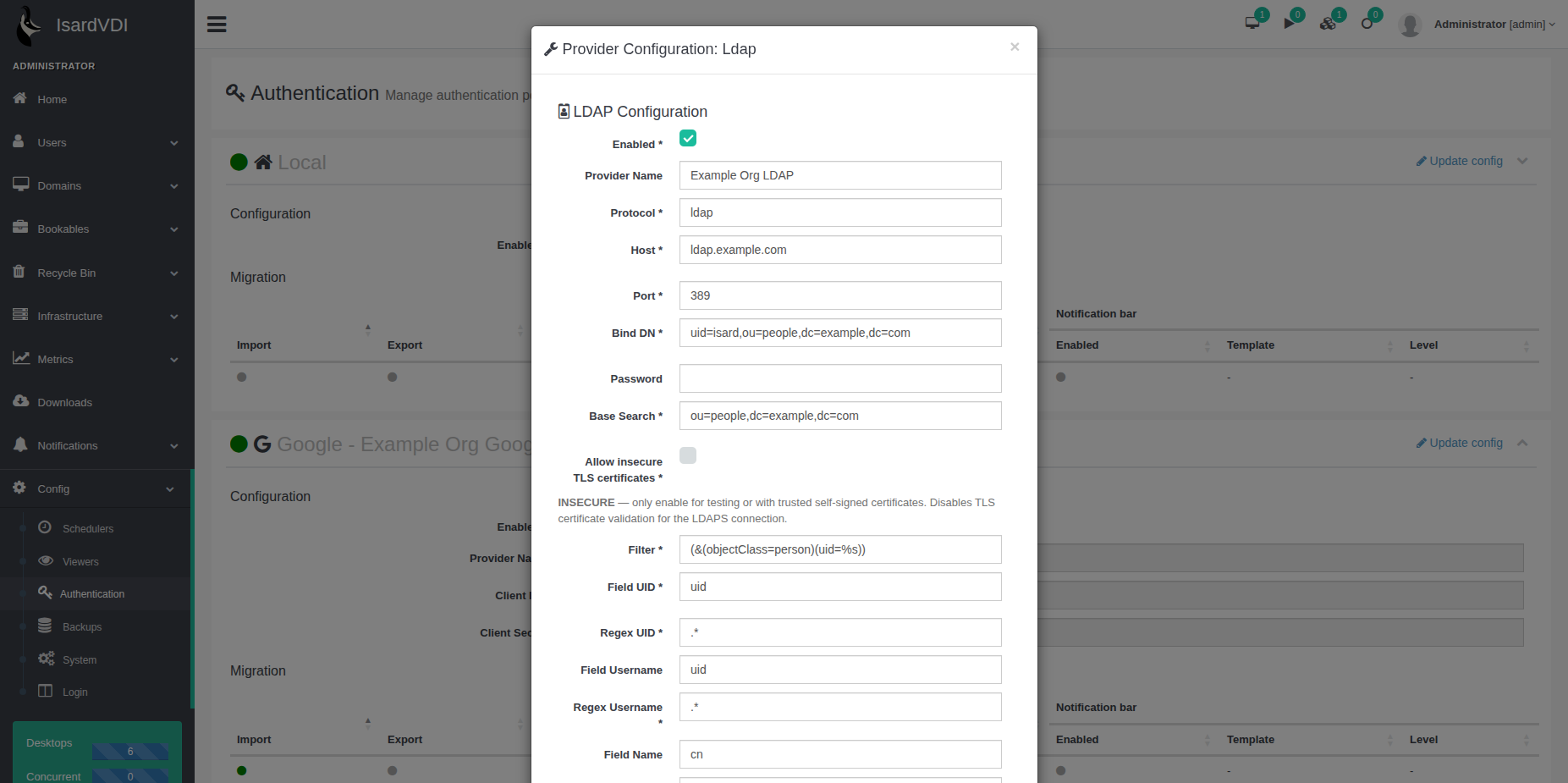
| Option | Default | Description |
|---|---|---|
| Enabled | Unchecked | Enables the provider. |
| Provider Name | Empty | Descriptive name of the provider. It is shown in the title of the administration panel and used as the prefix of automatically created groups. If left empty, ldap is used. |
| Protocol | ldap |
ldap or ldaps. |
| Host | — | Name or address of the LDAP server. |
| Port | 389 |
Port the server listens on. Usually 389 for ldap and 636 for ldaps. |
| Bind DN | — | DN of the service account IsardVDI queries the directory with. |
| Password | — | Password of the service account. |
| Base Search | — | DN from which users are searched, for example ou=people,dc=example,dc=com. |
| Allow insecure TLS certificates | Unchecked | Disables validation of the TLS certificate of the LDAPS connection. |
| Filter | (&(objectClass=person)(uid=%s)) |
User search filter. %s is replaced by the username typed in the form. |
Allow insecure TLS certificates
This option disables the server certificate check and leaves the connection exposed to man-in-the-middle attacks. It should only be used for testing or with self-signed certificates of known trust.
The password is not shown again
The Password field is always empty when the window is reopened: the API never returns stored secrets. If you save the form with the field empty, the previous password is kept; it is only written when a new value is typed.
Attribute mapping
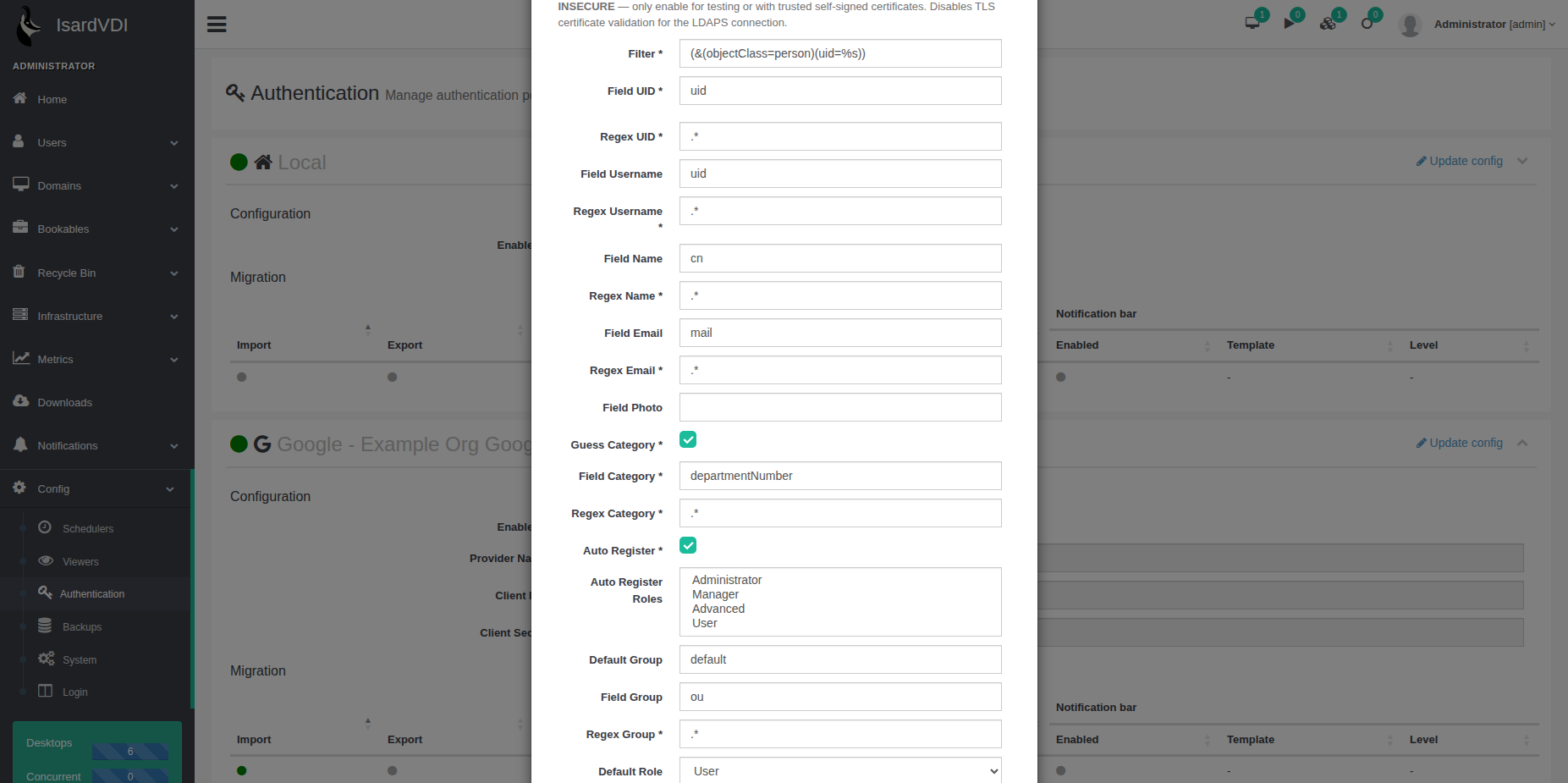
Each piece of user data is read from an LDAP attribute (Field …) and, optionally, its value is filtered with a regular expression (Regex …).
| Option | Default | Description |
|---|---|---|
| Field UID | — | Attribute holding the user's unique identifier. Required. |
| Field Username | — | Attribute holding the login name. |
| Field Name | — | Attribute holding the name to display. |
| Field Email | — | Attribute holding the email address. |
| Field Photo | — | Attribute holding the URL of the photo. |
| Regex … | .* |
Filter applied to the corresponding field. |
| Save Email | Unchecked in new installations (checked in upgraded installations) | Stores the email in the user record. Even if it is not stored, it is used to validate the domain during authentication. |
How regular expressions are applied
The expression is applied to the attribute value and the first capture group is extracted. If the expression has none, the whole match is extracted. By default, .* takes the whole value.
Example: with the homeDirectory attribute set to /home/users/informatica/2n-dam/mgarcia, the expression /home/users/([^/]+)/ extracts informatica.
Category
| Option | Default | Description |
|---|---|---|
| Guess Category | Unchecked | Deduces the category from an LDAP attribute instead of using the one the user chooses in the form. It lets several categories share the same login page. |
| Field Category | — | Attribute holding the category. Required with Guess Category checked. |
| Regex Category | .* |
Filter applied to the previous field. |
The extracted value is compared with the category UID
IsardVDI looks for a category whose UID field matches the extracted value exactly. It is not compared with the name or the internal identifier.
Therefore, the category must be created beforehand in Users → Management with the UID field filled in. If the extracted value does not match any category, the login is denied. If several categories match, the user is asked to choose one.
Self-registration
With Auto Register checked, an LDAP user that does not yet exist in IsardVDI is created automatically when logging in. The groups and roles block appears:
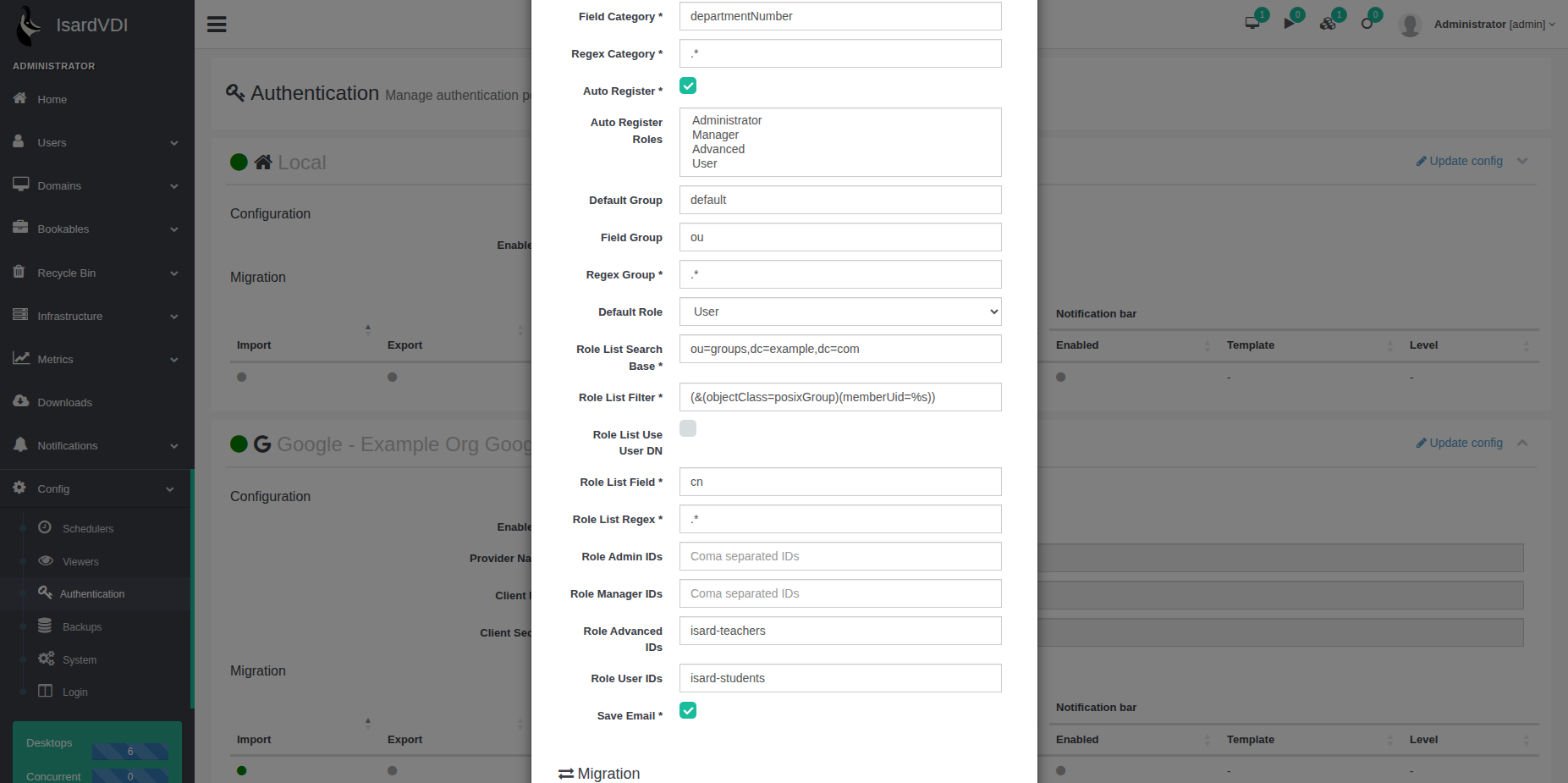
| Option | Default | Description |
|---|---|---|
| Auto Register | Unchecked | Enables automatic user creation. |
| Auto Register Roles | All | Only users whose computed role is in the list are registered automatically. With no selection, all are registered. |
| Default Group | default |
Group assigned when none is extracted from the directory. |
| Field Group | — | Attribute holding the user's group. |
| Regex Group | .* |
Filter applied to the previous field. |
| Default Role | — | Role assigned when no role mapping matches. |
| Role List Search Base | — | DN from which the user's groups are searched, for example ou=groups,dc=example,dc=com. |
| Role List Filter | (&(objectClass=posixGroup)(memberUid=%s)) |
Filter to find the user's groups. %s is replaced by the username. |
| Role List Use User DN | Unchecked | Replaces the %s of the filter with the user's full DN instead of the username. Needed in directories that reference members by their DN, such as Active Directory. |
| Role List Field | — | Attribute of the group entry holding the role name, typically cn. |
| Role List Regex | .* |
Filter applied to the previous field. |
| Role Admin IDs | Empty | Comma-separated values mapped to the admin role. |
| Role Manager IDs | Empty | Values mapped to the manager role. |
| Role Advanced IDs | Empty | Values mapped to the advanced role. |
| Role User IDs | Empty | Values mapped to the user role. |
The role mapping takes up the last part of the form:
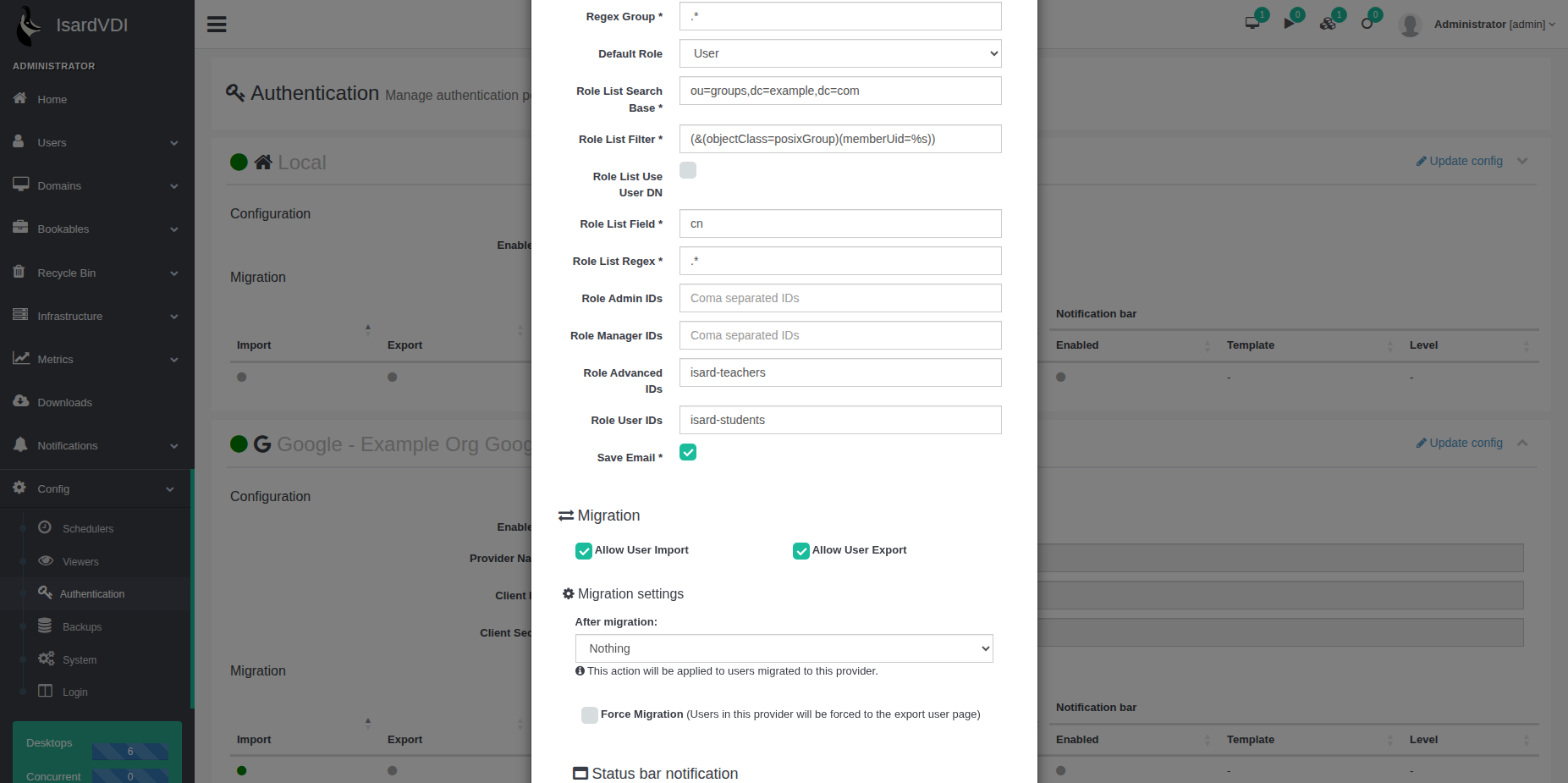
If several mappings match, the role with the most privileges wins
A user who belongs both to a group mapped to manager and to another mapped to user is created as manager. The privilege order is admin > manager > advanced > user.
If no mapping matches and Default Role is empty, the login fails. The same happens with the group: if none is extracted and Default Group is empty, the login fails.
How groups are created
Groups do not need to be created by hand: IsardVDI creates them by itself when needed, in the user's category, with the name [<Provider Name>] <extracted value>. If Provider Name is empty, the prefix is [ldap].
If several values are extracted from the attribute, the first one that already exists becomes the main group and the rest become Secondary groups. This can also be decided explicitly using named capture groups in Regex Group:
Groups are created automatically; categories are not
Unlike groups, categories are never created on their own. With Guess Category enabled, the category with the matching UID must have been created beforehand.
Migration
The rest of the window is the migration block, common to all providers and described in Introduction to authentication.
Complete example
This is the example used to generate the screenshots on this page, checked against a test OpenLDAP server. The directory data is fictitious.
dn: uid=isard,ou=people,dc=example,dc=com
objectClass: inetOrgPerson
uid: isard
cn: IsardVDI Service
sn: Service

dn: uid=mgarcia,ou=people,dc=example,dc=com
objectClass: inetOrgPerson
uid: mgarcia
cn: Marta Garcia Puig
sn: Garcia Puig
mail: mgarcia@example.com
departmentNumber: informatica
ou: 2n-dam

dn: uid=jlopez,ou=people,dc=example,dc=com
objectClass: inetOrgPerson
uid: jlopez
cn: Joan Lopez Serra
sn: Lopez Serra
mail: jlopez@example.com
departmentNumber: informatica
ou: 2n-dam

dn: cn=isard-teachers,ou=groups,dc=example,dc=com
objectClass: posixGroup
cn: isard-teachers
gidNumber: 5001
memberUid: mgarcia

dn: cn=isard-students,ou=groups,dc=example,dc=com
objectClass: posixGroup
cn: isard-students
gidNumber: 5002
memberUid: jlopez
| Option | Value |
|---|---|
| Provider Name | Example Org LDAP |
| Protocol | ldap |
| Host | ldap.example.com |
| Port | 389 |
| Bind DN | uid=isard,ou=people,dc=example,dc=com |
| Base Search | ou=people,dc=example,dc=com |
| Filter | (&(objectClass=person)(uid=%s)) |
| Field UID | uid |
| Field Username | uid |
| Field Name | cn |
| Field Email | mail |
| Guess Category | Checked |
| Field Category | departmentNumber |
| Auto Register | Checked |
| Field Group | ou |
| Default Group | default |
| Default Role | User |
| Role List Search Base | ou=groups,dc=example,dc=com |
| Role List Filter | (&(objectClass=posixGroup)(memberUid=%s)) |
| Role List Field | cn |
| Role Advanced IDs | isard-teachers |
| Role User IDs | isard-students |
For Guess Category to work, a category with the UID informatica must exist.
Result
When they log in for the first time, the two directory users are created automatically in IsardVDI with the category, group and role deduced from their attributes:
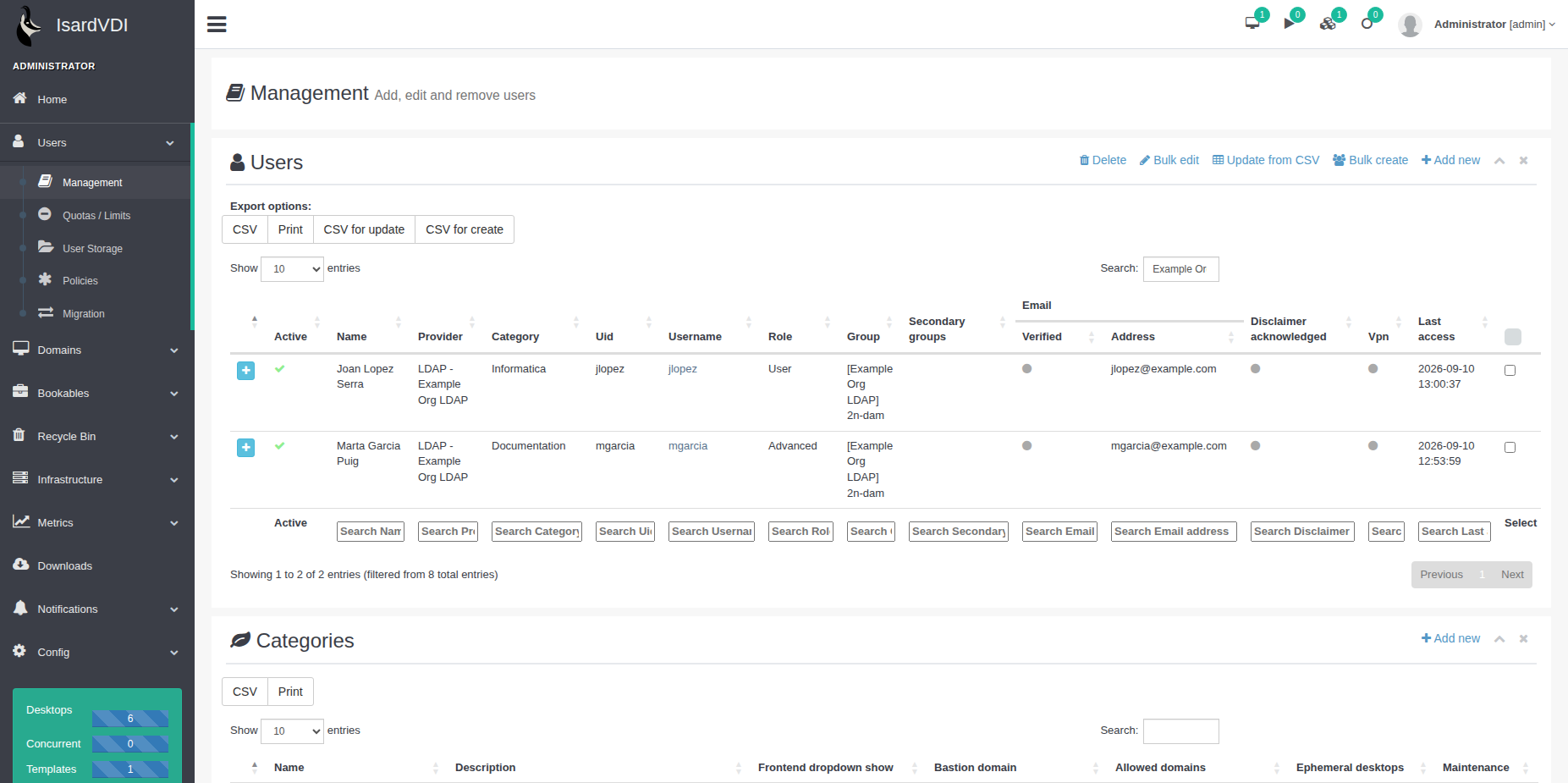
mgarciagets the Advanced role because she is a member of theisard-teachersgroup, mapped in Role Advanced IDs.jlopezgets the User role because he is a member of theisard-studentsgroup.- Both end up in the category deduced from
departmentNumber.
The [Example Org LDAP] 2n-dam group has been created automatically from the ou attribute. Since groups belong to a category, the same directory group appears once for each category a user has logged in to:
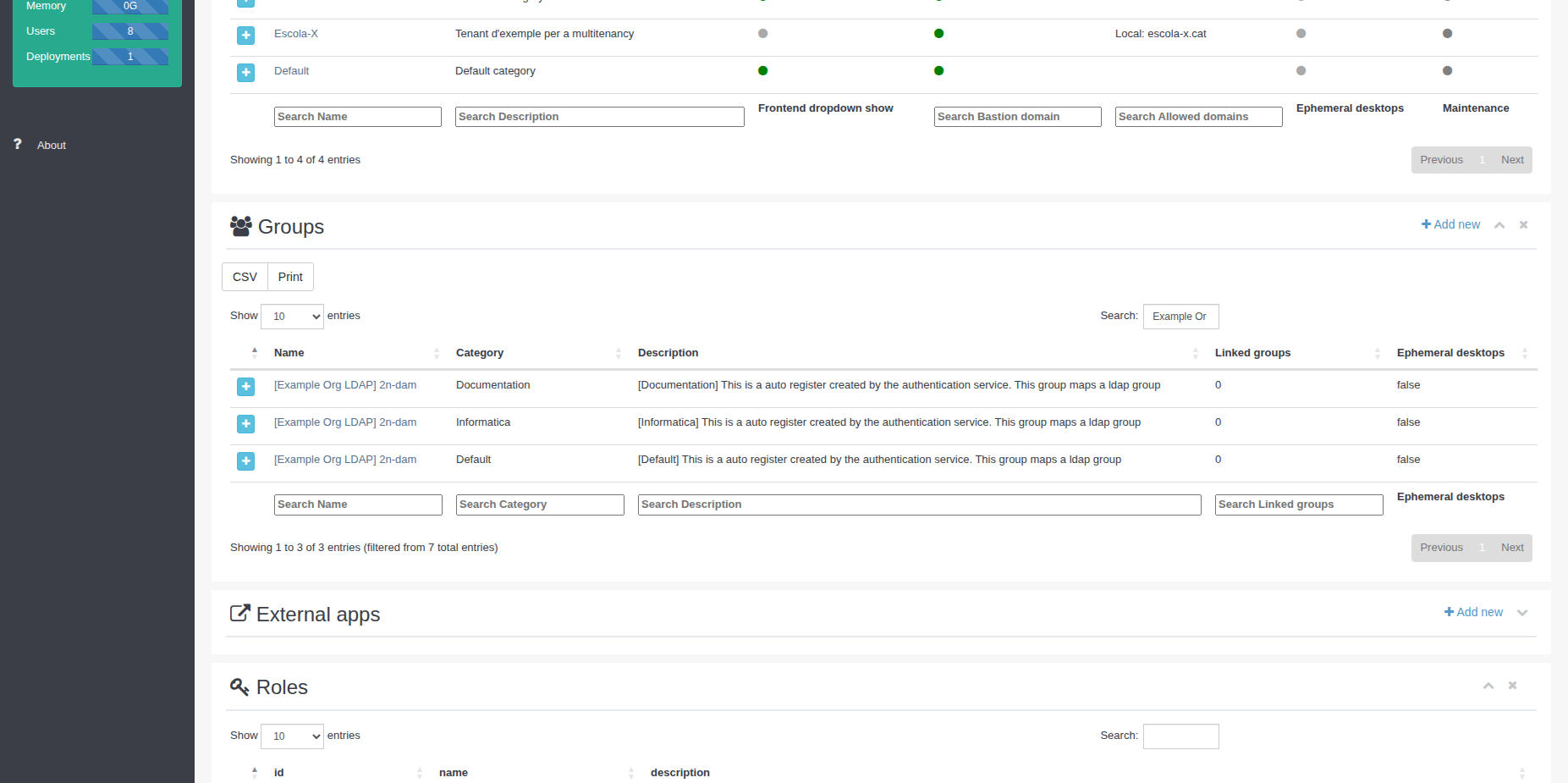
Users and groups created this way can be viewed and edited like any other in Users → Management, but their category, group and role are recomputed at every login from the directory.
Behavior for users
- If the screen shows the category selector, the user chooses one. If one must be chosen and they do not, the system shows «A category needs to be selected» and does not allow logging in.
- The user types their username and directory password in the same form as local users and clicks Login.
With Guess Category enabled, the category they choose is ignored and the one deduced from the directory is used.
The Forgot password? link does not work for LDAP accounts: the password is held by the directory and must be changed from the organization's systems.
The user's full journey and the messages they may see (incorrect username or password, disabled account, too many attempts) are in Access methods (LDAP tab) and Log in.
Troubleshooting
The provider messages can be seen in the authentication service logs:
| Symptom | Checks |
|---|---|
| Incorrect user or password with correct credentials | That the provider is enabled and that a minute has passed since saving. That Filter and Base Search find the user. |
| The service does not start the provider | That Host resolves and the port is reachable from the container: docker exec isard-authentication getent hosts <host>. |
| The user is validated but not created | That Auto Register is checked and the computed role is in Auto Register Roles. |
| The user is not created and the log mentions the category | That a category exists with the exact UID extracted by Regex Category. |
| The user is always created with the default role | That Role List Search Base and Role List Filter find the groups and that the service account has read permission on them. |
| Groups are not mapped with Active Directory | Check Role List Use User DN, since AD references members by their DN. |
The configuration can be validated from outside IsardVDI with ldapsearch, reproducing the same search the service makes:
# User search (Base Search + Filter)
ldapsearch -x -H ldap://ldap.example.com \
  -D "uid=isard,ou=people,dc=example,dc=com" -w "<password>" \
  -b "ou=people,dc=example,dc=com" "(&(objectClass=person)(uid=mgarcia))"

# Group search (Role List Search Base + Role List Filter)
ldapsearch -x -H ldap://ldap.example.com \
  -D "uid=isard,ou=people,dc=example,dc=com" -w "<password>" \
  -b "ou=groups,dc=example,dc=com" "(&(objectClass=posixGroup)(memberUid=mgarcia))" cn
The mapping between each option of this form and its AUTHENTICATION_AUTHENTICATION_LDAP_* key in isardvdi.cfg is documented in Authentication (installation).